

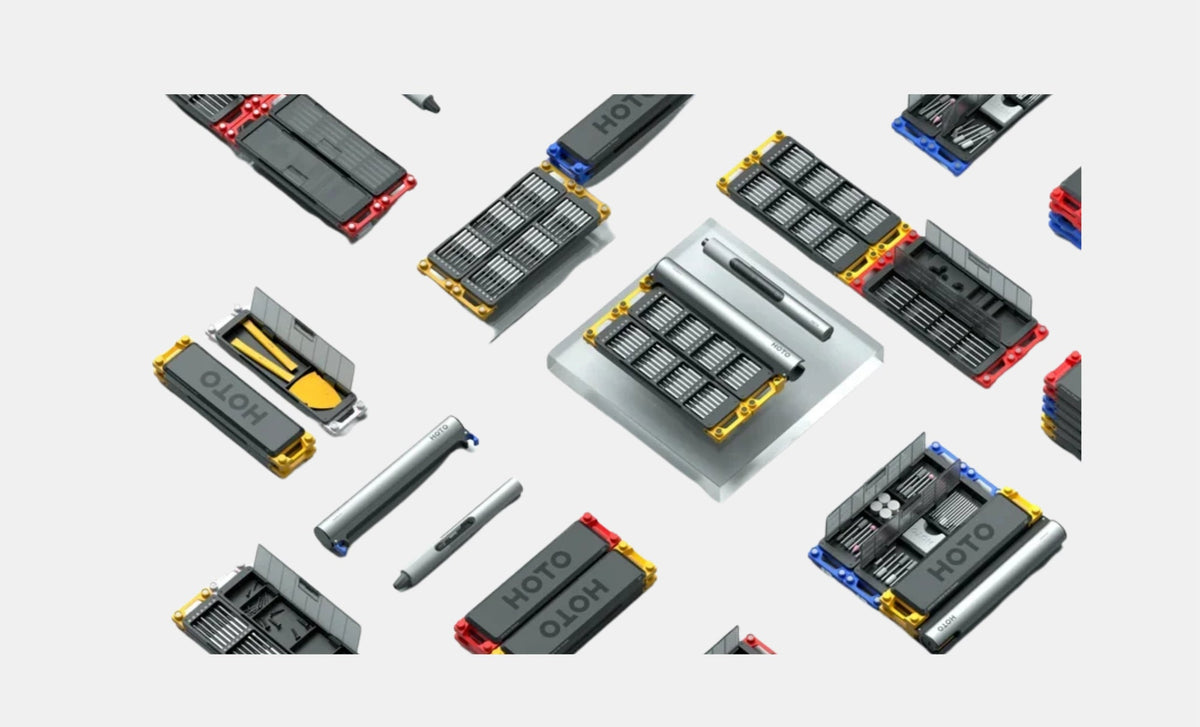
HOTO SNAPBLOQ - modular tools to organize your workshop and desk setup
Anyone who has ever taken apart a mechanical keyboard, repaired electronics, or completed their own DIY project knows the problem: screws disappear somewhere, screwdriver bits are scattered across the desk, and finding the right tool takes longer than the repair itself.
HOTO decided to approach this differently. Instead of another tool-filled case, it created HOTO SNAPBLOQ - a modular precision tool system that combines functionality, a compact design, and genuinely interesting aesthetics.
The magnetic modules can be connected together, stacked, and expanded with additional kits. All to create your own mini workshop without taking up half your desk.
Sounds interesting? Let's see how HOTO SNAPBLOQ works, what tools it offers, and whether it is really worth making room for in your desk setup.
What is HOTO SNAPBLOQ?

HOTO SNAPBLOQ is a system of compact precision tools equipped with modular magnetic organizers. It was designed for people working with electronics, model making, DIY projects, and minor repairs.
It includes, among other things, an electric precision screwdriver, mini drill, mini rotary tool, and soldering iron. Each tool performs a different task, but all share the same concept of workspace organization.
One thing is worth clarifying: SNAPBLOQ is not a single device with interchangeable heads. It is a system of separate tools whose storage modules can be connected together.
This means you can start with one kit and then expand your collection as needed.
A magnetic system that helps keep things organized
The most distinctive feature of SNAPBLOQ is its magnetic modules. Their design allows individual organizers to be combined and arranged in different configurations.
HOTO provides three main ways to use the system:
Workstation Mode - tools and accessories laid out as a workstation, with convenient access to the items you need.
Storage Mode - organizers stacked on top of one another to reduce the amount of desk space they take up.
Compact Kit Mode - a compact configuration designed for storage and transport.
This is a particularly interesting solution for people who do not have a separate workshop. If your desk is used for gaming, work, and DIY at the same time, the ability to quickly organize your tools makes a lot of sense.
Interestingly, HOTO also provides designs for modules intended for 3D printing. This opens up the possibility of creating your own configurations and expanding the system with additional elements.
Brushless motors - what do they offer in practice?
The three core SNAPBLOQ power tools - the screwdriver, mini drill, and mini rotary tool - use brushless motors.
Unlike conventional brushed motors, their design does not require carbon brushes to transfer current to the rotor. This eliminates one component subject to mechanical wear.
Brushless motors can offer greater efficiency, better speed control, and a longer lifespan, although the final results depend on the design of the entire device.
With precision tools, the ability to control operation is particularly important, not just maximum power. When assembling delicate components, predictable performance is often more useful than an impressive RPM figure.
Explore the HOTO SNAPBLOQ tools - what is each one for?
The system includes several devices designed for different applications. Although they may look similar at first glance, each one has been designed for a different type of work.
HOTO SNAPBLOQ S-A01 - electric precision screwdriver

If you are interested in mechanical keyboards, computers, or small electronics repairs, this is the model worth starting with.
HOTO SNAPBLOQ S-A01 is an electric precision screwdriver equipped with a brushless motor, LED ring light, and a set of 56 bits.
The device offers three torque settings:
0.05 Nm - for very delicate components and small screws.
0.35 Nm - for typical assembly work involving small electronics.
0.5 Nm - for connections requiring slightly more force.
The rotational speed is 250 RPM, while the built-in 800 mAh battery provides up to 60 minutes of operation according to the manufacturer. Charging is via USB-C.
Why is it a good choice for keyboards?
When disassembling a mechanical keyboard, you often need to remove a dozen or so screws securing the case or mounting plate. An electric screwdriver can significantly streamline this work, especially if you modify your equipment regularly.
However, remember to select the appropriate torque. For delicate threads, especially in plastic, it is worth doing the final tightening manually and carefully.
Who is it for? For custom keyboard enthusiasts, people servicing electronics, and anyone who regularly takes apart small devices.
HOTO SNAPBLOQ D-A03 - mini drill for precision projects

Not every drilling task requires a large drill. Sometimes you need to make a small hole in a case, a 3D-printed component, or a model.
In such situations, the HOTO SNAPBLOQ D-A03 comes in handy.
It is a compact mini drill with a brushless motor, offering three speed levels:
600 RPM,
900 RPM,
1200 RPM.
This range is intended for controlled drilling of small holes, not heavy renovation work.
The D-A03 can be useful when building prototypes, creating decorative elements, modifying enclosures, or working on electronic projects.
An example? You are 3D printing your own cable holder, but the mounting holes need adjustment. A mini drill allows you to make the required corrections without reaching for full-size equipment.
Keep in mind that the choice of drill bit, speed, and method of securing the component depends on the material being worked on. Particular caution is required when working with PCB boards and finished electronic devices.
Who is it for? For model makers, 3D printing enthusiasts, prototype creators, and DIY enthusiasts working on small projects.
HOTO SNAPBLOQ R-A04 - mini rotary tool for detailed work

A drill is primarily used to make holes. But what if you need to smooth the edge of a 3D print, polish a small component, or create an engraving?
That is where the HOTO SNAPBLOQ R-A04 comes in.
It is a multifunctional rotary tool designed for precision material processing. It offers stepless speed adjustment in the range from 15,000 to 22,000 RPM.
The kit includes accessories for various types of work, including:
* sanding small surfaces,
* polishing details,
* engraving,
* minor finishing work.
The device weighs approximately 97 g, and cordless operation makes it easier to maneuver around small objects. The model also supports operation with suitable wired power.
The mini rotary tool can be particularly useful for finishing 3D prints, creating decorations, and personalizing various accessories.
However, caution is required when sanding. High rotational speeds can cause excessive material heating, especially with plastics. Not every material and attachment is suitable for operation at maximum speed.
Who is it for? For model makers, accessory creators, 3D printing enthusiasts, and people involved in precision finishing work.
HOTO SNAPBLOQ I-A06 - soldering iron for electronics

The SNAPBLOQ system also includes a tool intended for more advanced electronics work.
HOTO SNAPBLOQ I-A06 is a compact soldering iron with temperature adjustment from 100 to 450°C.
According to the manufacturer's specifications, it offers up to 60 W when running on battery power and up to 140 W with suitable wired power. It uses interchangeable C245-standard tips and a PID temperature control system.
What can it be used for?
Primarily for soldering wires, repairing electrical connections, and completing electronic projects. It will also be useful for people building DIY devices or working with PCB boards.
In the world of mechanical keyboards, a soldering iron may be needed when building designs that require soldering switches or repairing connections on the board. However, it is not necessary for regular switch replacement in hot-swap keyboards.
This is equipment that requires appropriate skills. The high tip temperature creates a risk of burns and component damage, so when soldering, ensure a stable workstation, proper ventilation, and safe working conditions.
Who is it for? For people involved in electronics repair, soldering, and more advanced DIY projects.
HOTO SNAPBLOQ - tool comparison
Not sure which model to choose? The table below presents the key differences.
| Model | Main application | Key specifications |
|---|---|---|
| S-A01 | Driving and removing screws | 0.05 / 0.35 / 0.5 Nm; 250 RPM |
| D-A03 | Precision drilling | 600 / 900 / 1200 RPM |
| R-A04 | Sanding, polishing, engraving | 15,000 - 22,000 RPM |
| I-A06 | Electronics soldering | 100 - 450°C; up to 60 W cordless and 140 W wired |
It is worth noting that a higher RPM figure does not automatically mean a better tool.
The D-A03 was designed for drilling, while the R-A04 is intended for tasks requiring rapid rotation of a properly selected attachment. These are two different applications, so comparing them solely based on RPM does not make much sense.
Similarly, the S-A01 screwdriver will not replace a mini drill, even though both devices use rotary motion.
How does HOTO SNAPBLOQ perform in practice?
The greatest advantage of the system is not a single technical specification, but the ability to select tools for specific tasks and store them in an organized way.
Building and modifying mechanical keyboards
For many people, experimenting with keyboards ends with replacing Keycaps. Others go much further: they disassemble cases, modify sound dampening, replace stabilizers, or build custom designs themselves.
In this case, the most useful SNAPBLOQ tool will be the S-A01.
The electric screwdriver makes it easier to repeatedly remove and install case components. If you also create your own parts or mounts, the mini drill and mini rotary tool can help with fitting prototypes.
The soldering iron will be useful when working with PCB boards that require soldering.
However, this does not mean you need all four tools to modify a keyboard. For most typical tasks, a good screwdriver set is enough, while for replacing hot-swap switches - a suitable puller.
Repairing electronics and gaming accessories
Controllers, mice, handheld consoles, and other electronic devices often use small screws and delicate fastening components.
A precision screwdriver provides more convenient access to their interiors, while a wide selection of bits increases the chance of matching the bit to a specific screw type.
For repairs requiring soldering, the I-A06 will be useful.
However, remember that simply having the tools does not guarantee a successful repair. Before taking a device apart, it is worth checking its construction, the type of screws used, how to disconnect the battery, and any potential warranty consequences.
3D printing, model making, and DIY projects
This is where the D-A03 mini drill and R-A04 mini rotary tool can truly demonstrate their capabilities.
Printed components do not always turn out exactly as the design intends. Sometimes you need to adjust a hole, remove a small excess of material, or smooth an edge.
The mini drill is suitable for making and adjusting holes, while the mini rotary tool is ideal for surface processing.
Combining these devices with modular organizers makes particular sense in a small home workshop, where every centimeter of workspace is worth its weight in gold.
Is it worth buying the complete HOTO SNAPBLOQ kit or individual tools?
That depends on what you actually do on a daily basis.
If you mainly take apart keyboards, controllers, and electronics, the S-A01 screwdriver will be the best starting point. The other devices might simply sit in their organizers most of the time.
If you create DIY projects, 3D print, or work on models, it is worth considering pairing the D-A03 mini drill with the R-A04 mini rotary tool. These two tools complement each other.
Meanwhile, people who regularly perform different types of work may be interested in the HOTO SNAPBLOQ Pioneer Edition, a kit including three core power tools.
When choosing a larger package, however, it is worth checking the current configuration and comparing its price with purchasing individual modules.
Most importantly, do not buy tools solely because they look good next to each other. Although in the case of SNAPBLOQ, it must be said that the temptation can be considerable.
Who is HOTO SNAPBLOQ a good choice for?
HOTO SNAPBLOQ is primarily aimed at people who enjoy working on small devices and want to keep their workspace organized.
The system may appeal to custom keyboard enthusiasts, hobby electronics enthusiasts, model makers, DIY project creators, and 3D printing fans.
Its strengths include compact dimensions, modular organizers, gradual expandability, and tools specialized for specific tasks.
However, it is not a replacement for full-size workshop equipment. A compact mini drill will not replace a powerful drill when working with demanding materials, and a mini rotary tool is not intended for heavy-duty processing.
It is also worth remembering that modular construction and aesthetics have value, but for someone who needs only one simple tool, a cheaper conventional kit may be a more sensible choice.
HOTO SNAPBLOQ - summary. Is it worth it?
HOTO SNAPBLOQ shows that precision tools do not have to mean a plastic case filled with random accessories.
The manufacturer has focused on a system in which each device has its own purpose, while the magnetic modules make it possible to organize the workspace and expand it with new projects.
The most interesting feature of SNAPBLOQ is precisely the combination of functional tools and thoughtfully organized space.
If your desk regularly turns into a small workshop for keyboard modifications, electronics repairs, or DIY project creation, this system is definitely worth exploring.
You do not have to buy everything at once. Start with the device you will actually use, then add more modules when the need arises.
Explore HOTO tools available at Shelter.pl and choose a kit tailored to your projects.


Share:
NuPhy WH80 - Wireless 8000 Hz Keyboard